


When an SSL/TLS certificate nears the end of its validation period, Enom reissues it automatically through the issuing certificate authority (CA). This article explains how automatic reissuance works for the two CAs available through Enom — DigiCert/GeoTrust and Sectigo (Comodo) — and how to check on a reissuance or retrieve a certificate through the API.
How reissuance fits into your certificate's lifecycle
Certificate authorities require domain validation to be refreshed periodically during a certificate's active term, not just at initial issuance. Enom handles this automatically: as a certificate approaches its next validation deadline, the issuing CA reissues it using the domain validation (DV) method already on file, and delivers the new certificate to the technical contact on the original order.
The reissue window and API mechanics are the same across both CAs — the notification sender is the only real difference.
The timeline below shows this lifecycle for a one-year order. It applies to both DigiCert/GeoTrust and Sectigo (Comodo) certificates, since Enom's reissue timing is identical across both CAs.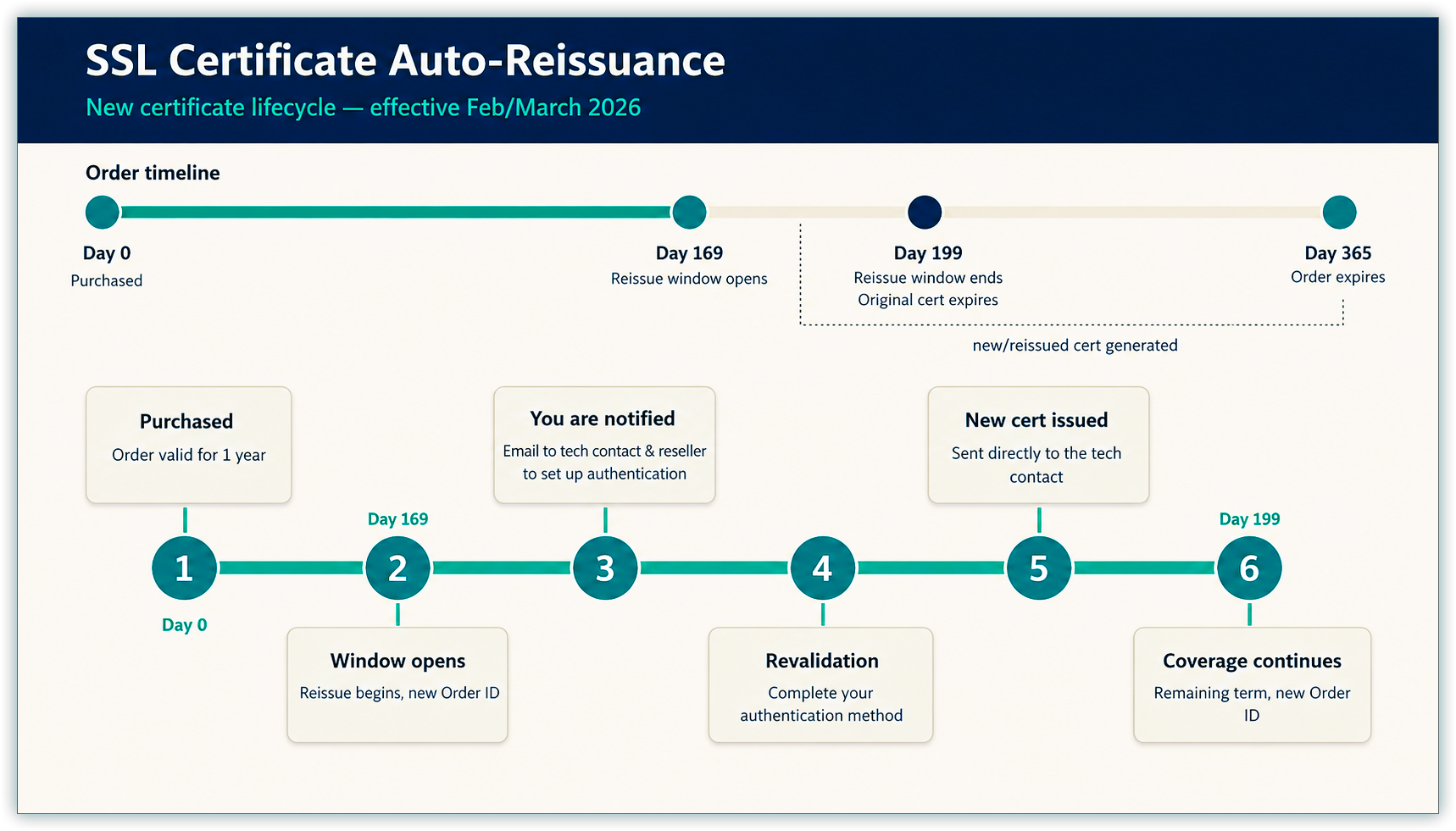
Before you begin
- A valid technical contact email address on the original certificate order. Enom delivers both the reissuance notice and the reissued certificate to this address.
- Your certificate's Domain Validation (DV) method (email, FILE, or DNS). The reissued certificate retains the same DV method as the original order, so knowing which method you're on tells you what action, if any, you'll need to take.
- API access, if you want to check on a pending reissuance or retrieve the reissued certificate programmatically.
Reissue timing and notifications
| Certificate authority | Reissue window opens | Reminder sent to |
|---|---|---|
| DigiCert/GeoTrust | 30 days before the certificate's validation expiration date (original validation start date + 169 days) | Technical contact email on the original order |
| Sectigo (Comodo) | 30 days before the certificate's validation expiration date (original validation start date + 169 days) | Technical contact email on the original order |
Note: There's currently no way to query in advance when a certificate is due for reissuance — CertGetCertDetail won't return reissue information before day 169 of the validation period. Track your own renewal dates if you want advance visibility beyond the CA's day-169 email reminder.
Estimating your reissue window
Since both CAs share the same 169-day timing, you can estimate reissue activity across your whole portfolio with one table, without waiting on the day-169 email or querying each order individually.
| Certificate validated in… | Reissue window opens around… |
|---|---|
| January | July |
| February | August |
| March | August |
| April | October |
| May | October |
| June | December |
| July | December |
| August | January |
| September | March |
| October | April |
| November | May |
| December | June |
These months are estimates, not exact dates — the 169-day count runs from the validation start date, which can trail the purchase date by a few days if DV wasn't completed immediately. For an exact date on a specific order, add 169 days to that order's validation start date, or check CertGetCertDetail once you're within the window.
Completing domain validation for a reissued certificate
Your DV method carries over from the original order, so you generally don't need to choose it again.
- If your original DV method was email, the approver email address already on file receives a link to approve the reissued order.
- If your original DV method was FILE or DNS, you need a new DCV (Domain Control Validation) token to validate the reissued order. Add the
GetCurrentDVDataparameter (valuetrue) to yourCertGetCertDetailcalls to retrieve it.
Receiving the reissued certificate
Once domain validation completes, Enom reissues the certificate and sends it to the technical contact email address from the original order. The technical contact receives both the reissuance notice and the certificate itself — the approver email is used solely for DV validation and won't receive the certificate.
The reissued certificate is also available through the control panel and via the API (see below).
Checking reissuance status and retrieving certificates via API
| To do this | Use this API call | Notes |
|---|---|---|
| Check the status of a pending reissuance | CertGetCertDetail with GetCurrentCertStatus=true | The returned CertStatus field changes to "Processing" when the CA initiates the reissue, and to "Certificate Issued" once it completes. |
| Retrieve DNS/File values for domain control on a pending order | CertGetCertDetail with GetCurrentCertStatus=true and GetCurrentDvData=true | Returns the current DCV values needed to complete validation. |
| Retrieve the reissued certificate | CertGetCertDetail with the original CertID and GetCurrentCertStatus=true | Only returns the reissued certificate once the date of issue is more than 169 days from today. |
Note: The CertID stays the same on the reissued certificate as it was on the original order, so you don't need to track a new identifier.
Note: Include GetCurrentCertStatus=true on your CertGetCertDetail calls whenever you need the most current CertStatus and SSLCertificate values. Without it, Enom returns values from its own database, which may not reflect a certificate that was just reissued — including one reissued automatically without a status check.
Next steps
- Confirm your technical contact and approver email addresses are current. These addresses control where reissuance notices, DV approval links, and reissued certificates are delivered.
- Set your own reminder ahead of day 169 of your validation period if you want advance notice of an upcoming reissuance, since Enom doesn't currently offer one before then.
Questions? Contact Enom Support.
How helpful was this article?
Thanks for your feedback!
Do you still need help? If so please submit a request here.